Layouts
The GitHub activity card comes in several layouts, and this command lists them.
ghchronicle -card-layoutsPrints them with the fields each shows by default. Every layout below has a
section of its own, stating its family, its motion, the width it is drawn at
and those fields, over a picture of the card. Each card is shown in the palette
this page is in, light or dark; every layout draws both, and auto puts both
in one file.
Where a layout animates, the animation plays once and settles on the complete static card, so every picture below is that settled frame and not a moment in the middle of one. How that is set, and what switches it off, is Motion.
The two families
Section titled “The two families”The chronicle family is this tool’s own look. The github family uses GitHub’s Primer palette and monospace numbers so the card sits in a profile README as if GitHub had drawn it.
summary
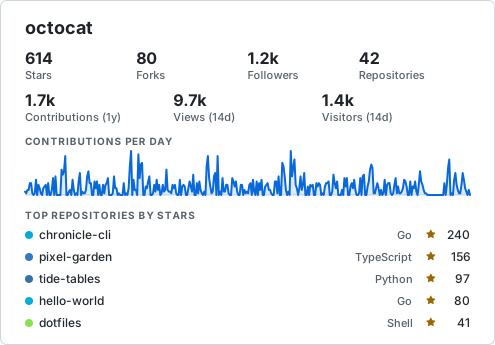
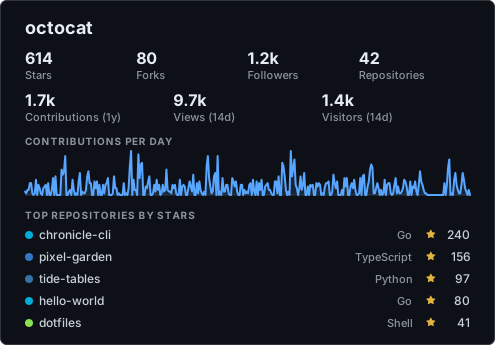
Section titled “summary”The original card: title, two rows of numbers, a sparkline and the most starred repositories.
- Family
- chronicle
- Motion
- still
- Width
- 495 px, drawn from 300 to 1200
- Default fields
stars,forks,followers,repos,contributions,views,visitors,sparkline,top_repos
Command for summary
Binary
ghchronicle -card-layout summary -card-theme both -card-only -card card.svg -config config.yamlGitHub Action
- uses: jmrplens/ghchronicle@v2 with: token: ${{ secrets.GHCHRONICLE_TOKEN }} mode: card card: generated/card.svg card-layout: summary card-theme: bothgithub-stats
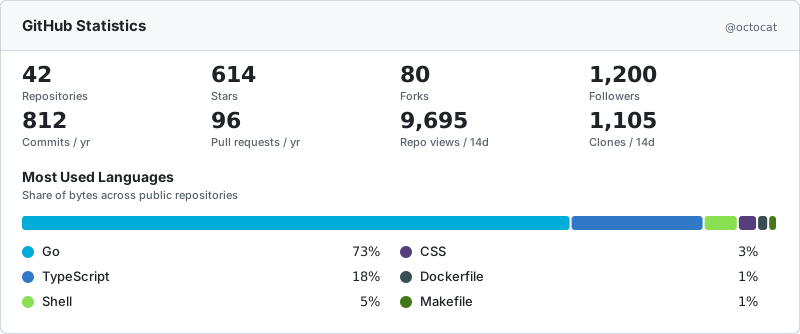
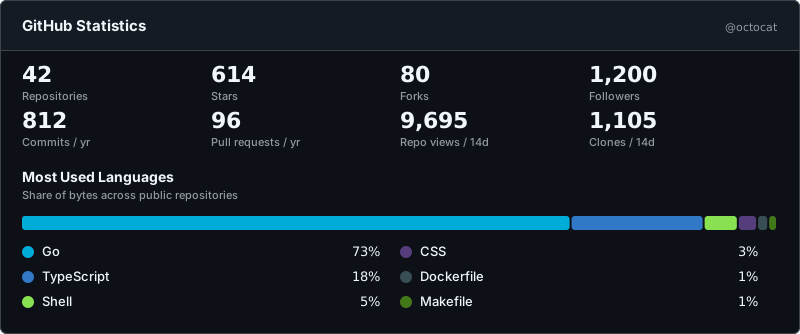
Section titled “github-stats”GitHub’s own box: a header band, rows of four monospace numbers and a language share bar with its legend. The widest of them, and the one that looks most native in a profile README. The numbers count up, and the bar grows in from its left edge once they have landed.
- Family
- github
- Motion
- plays once
- Width
- 800 px, drawn from 600 to 1200
- Default fields
repos,stars,forks,followers,commits,pull_requests,views,clones,languages
Command for github-stats
Binary
ghchronicle -card-layout github-stats -card-theme both -card-only -card card.svg -config config.yamlGitHub Action
- uses: jmrplens/ghchronicle@v2 with: token: ${{ secrets.GHCHRONICLE_TOKEN }} mode: card card: generated/card.svg card-layout: github-stats card-theme: bothgithub-compact
Section titled “github-compact”One row of monospace numbers under a thin header band.
- Family
- github
- Motion
- still
- Width
- 495 px, drawn from 300 to 1200
- Default fields
stars,forks,followers,repos,commits


Command for github-compact
Binary
ghchronicle -card-layout github-compact -card-theme both -card-only -card card.svg -config config.yamlGitHub Action
- uses: jmrplens/ghchronicle@v2 with: token: ${{ secrets.GHCHRONICLE_TOKEN }} mode: card card: generated/card.svg card-layout: github-compact card-theme: bothbadge-row
Section titled “badge-row”A row of 20 pixel pill badges, one per number, for a README line.
- Family
- chronicle
- Motion
- still
- Width
- follows its content
- Default fields
stars,forks,followers,repos,contributions


Command for badge-row
Binary
ghchronicle -card-layout badge-row -card-theme both -card-only -card card.svg -config config.yamlGitHub Action
- uses: jmrplens/ghchronicle@v2 with: token: ${{ secrets.GHCHRONICLE_TOKEN }} mode: card card: generated/card.svg card-layout: badge-row card-theme: bothwide-banner
Section titled “wide-banner”A full-width 60 pixel banner: login on the left, numbers spread across, the sparkline drawing itself behind them.
- Family
- chronicle
- Motion
- plays once
- Width
- 800 px, drawn from 500 to 1200
- Default fields
stars,forks,followers,contributions,sparkline


Command for wide-banner
Binary
ghchronicle -card-layout wide-banner -card-theme both -card-only -card card.svg -config config.yamlGitHub Action
- uses: jmrplens/ghchronicle@v2 with: token: ${{ secrets.GHCHRONICLE_TOKEN }} mode: card card: generated/card.svg card-layout: wide-banner card-theme: bothsparkline-hero
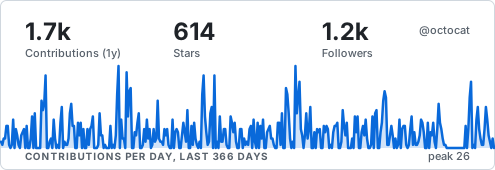
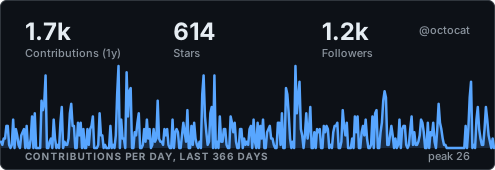
Section titled “sparkline-hero”The contribution sparkline is the whole card, with up to three numbers overlaid. The line draws itself on load.
- Family
- chronicle
- Motion
- plays once
- Width
- 495 px, drawn from 300 to 1200
- Default fields
contributions,stars,followers,sparkline
Command for sparkline-hero
Binary
ghchronicle -card-layout sparkline-hero -card-theme both -card-only -card card.svg -config config.yamlGitHub Action
- uses: jmrplens/ghchronicle@v2 with: token: ${{ secrets.GHCHRONICLE_TOKEN }} mode: card card: generated/card.svg card-layout: sparkline-hero card-theme: bothlanguage-ring
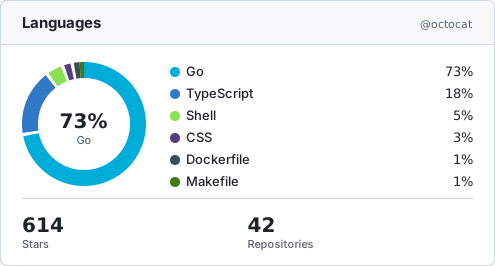
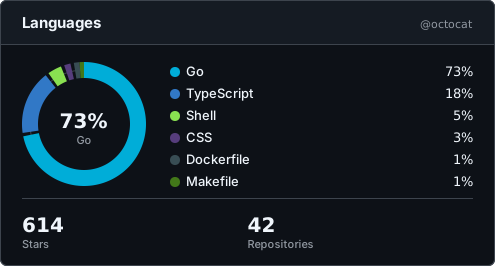
Section titled “language-ring”A donut of language shares with the legend beside it and a row of headline numbers. Each slice draws itself around the ring after the one before it, and the legend appears when the donut is whole.
- Family
- github
- Motion
- plays once
- Width
- 495 px, drawn from 400 to 1200
- Default fields
languages,stars,repos
Command for language-ring
Binary
ghchronicle -card-layout language-ring -card-theme both -card-only -card card.svg -config config.yamlGitHub Action
- uses: jmrplens/ghchronicle@v2 with: token: ${{ secrets.GHCHRONICLE_TOKEN }} mode: card card: generated/card.svg card-layout: language-ring card-theme: bothrepo-list
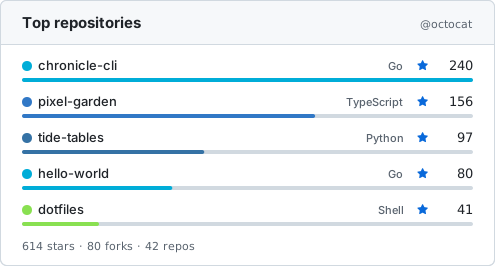
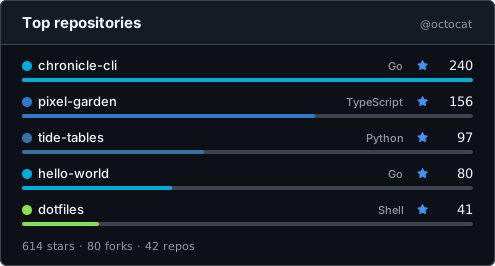
Section titled “repo-list”The most starred repositories as the main content: language dot, stars and a bar per row, totals underneath.
- Family
- github
- Motion
- still
- Width
- 495 px, drawn from 300 to 1200
- Default fields
top_repos,stars,forks,repos
Command for repo-list
Binary
ghchronicle -card-layout repo-list -card-theme both -card-only -card card.svg -config config.yamlGitHub Action
- uses: jmrplens/ghchronicle@v2 with: token: ${{ secrets.GHCHRONICLE_TOKEN }} mode: card card: generated/card.svg card-layout: repo-list card-theme: bothactivity-heatmap
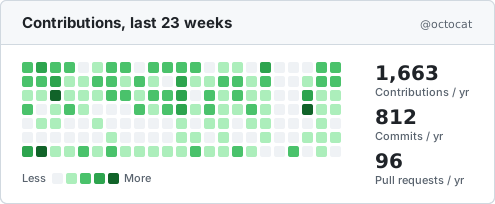
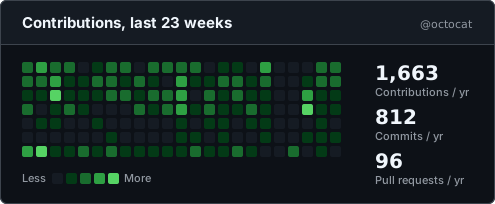
Section titled “activity-heatmap”As much of the contribution calendar as the width holds, up to a year of it, as
GitHub’s green squares, with up to three numbers beside it. The week count is
not a fixed number: the grid takes whatever room the numbers beside it leave, so
it ends where the card does rather than stopping a third of the way short. At
the width this layout declares that is twenty-three weeks, at its minimum
sixteen, and -card-width at the far end its facts state draws the whole year
the collector keeps. An account whose numbers reach seven digits takes a wider
column for them and leaves the grid a week or two fewer, which is the same rule
seen from the other side: at the width this layout declares, a million
contributions is twenty-two weeks rather than twenty-three, and six digits
still fits inside the labels. The far end is where the year lands for the three
numbers this layout draws by default, so a card asked for fewer, or for numbers
with shorter labels, reaches the year before it and has room to spare at the
end: -card-fields sparkline draws its whole year well short of the far end.
The weeks fade in from the left, the wave crossing the grid in 0.22 s however
many weeks it holds, so the calendar fills in as a wave of the same length at
every width.
- Family
- github
- Motion
- plays once
- Width
- 495 px, drawn from 400 to 891
- Default fields
sparkline,contributions,commits,pull_requests
Command for activity-heatmap
Binary
ghchronicle -card-layout activity-heatmap -card-theme both -card-only -card card.svg -config config.yamlGitHub Action
- uses: jmrplens/ghchronicle@v2 with: token: ${{ secrets.GHCHRONICLE_TOKEN }} mode: card card: generated/card.svg card-layout: activity-heatmap card-theme: bothanimated-counters
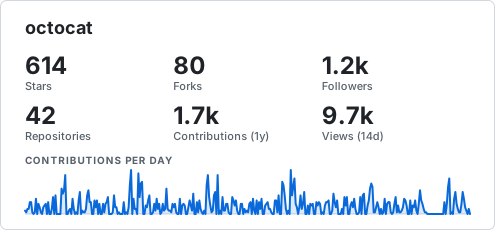
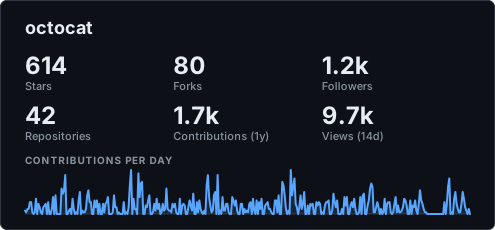
Section titled “animated-counters”Numbers that count up on load over a sparkline that draws itself, settling to the static card.
- Family
- chronicle
- Motion
- plays once
- Width
- 495 px, drawn from 300 to 1200
- Default fields
stars,forks,followers,repos,contributions,views,sparkline
Command for animated-counters
Binary
ghchronicle -card-layout animated-counters -card-theme both -card-only -card card.svg -config config.yamlGitHub Action
- uses: jmrplens/ghchronicle@v2 with: token: ${{ secrets.GHCHRONICLE_TOKEN }} mode: card card: generated/card.svg card-layout: animated-counters card-theme: bothterminal
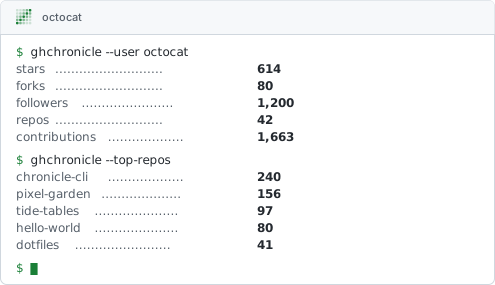
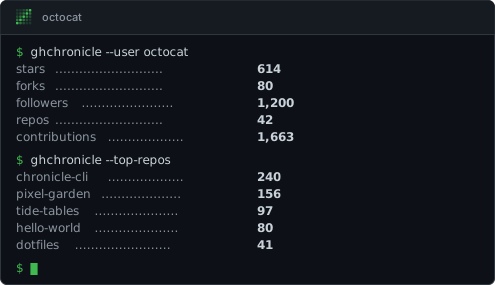
Section titled “terminal”A terminal window with the project’s mark in its title bar, one line of output per number and one per repository. The numbers type themselves in, a line at a time, under a cover painted in the card’s own background colour.
The cursor at the prompt is the card’s one piece of endless motion, and it does
a different thing in each motion. Played once it sits lit while the numbers
arrive, blinks a couple of times when the last one lands and settles lit, which
is the state the finished card rests in. Under loop it blinks from the moment
the window is drawn and never stops, because a cursor blinks for the reason a
terminal is open and not for the reason a card is finished. The typing itself
happens once either way.
- Family
- chronicle
- Motion
- plays once, or in a loop
- Width
- 495 px, drawn from 360 to 1200
- Default fields
stars,forks,followers,repos,contributions,top_repos
Command for terminal
Binary
ghchronicle -card-layout terminal -card-theme both -card-only -card card.svg -config config.yamlghchronicle -card-layout terminal -card-theme both -card-only -card card.svg -config config.yaml -card-motion loopGitHub Action
- uses: jmrplens/ghchronicle@v2 with: token: ${{ secrets.GHCHRONICLE_TOKEN }} mode: card card: generated/card.svg card-layout: terminal card-theme: both- uses: jmrplens/ghchronicle@v2 with: token: ${{ secrets.GHCHRONICLE_TOKEN }} mode: card card: generated/card.svg card-layout: terminal card-theme: both card-motion: loopticker
Section titled “ticker”A band of pills, one per number and one per repository, scrolling from right to left. The content is repeated end to end and the band moves by exactly one copy, so the picture at the end of a pass is the picture at its start and the loop has no seam. Played once, it makes a single pass and comes back to the beginning. The band scrolls at a fixed speed, so a card with more in it takes longer to come round than any other layout takes to settle.
- Family
- chronicle
- Motion
- plays once, or in a loop
- Width
- 800 px, drawn from 400 to 1200
- Default fields
stars,forks,followers,repos,contributions,commits,views,top_repos


Command for ticker
Binary
ghchronicle -card-layout ticker -card-theme both -card-only -card card.svg -config config.yamlghchronicle -card-layout ticker -card-theme both -card-only -card card.svg -config config.yaml -card-motion loopGitHub Action
- uses: jmrplens/ghchronicle@v2 with: token: ${{ secrets.GHCHRONICLE_TOKEN }} mode: card card: generated/card.svg card-layout: ticker card-theme: both- uses: jmrplens/ghchronicle@v2 with: token: ${{ secrets.GHCHRONICLE_TOKEN }} mode: card card: generated/card.svg card-layout: ticker card-theme: both card-motion: looplanguage-bars
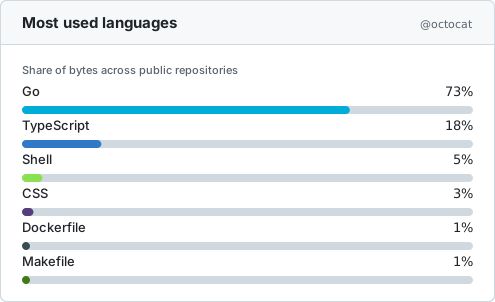
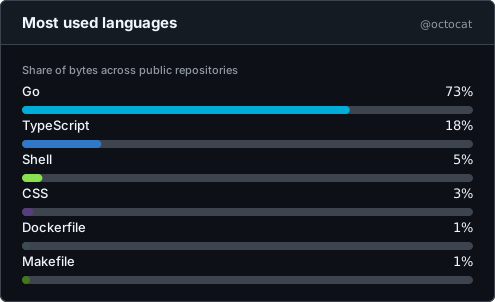
Section titled “language-bars”One full-width bar per language, each growing from its own left edge after the
one above it, with the name and the share arriving once their own bar has
stopped. The layout that shows the share of a language as its own line, where
language-ring shows all of them in one donut and github-stats in one bar.
- Family
- github
- Motion
- plays once
- Width
- 495 px, drawn from 360 to 1200
- Default fields
languages
Command for language-bars
Binary
ghchronicle -card-layout language-bars -card-theme both -card-only -card card.svg -config config.yamlGitHub Action
- uses: jmrplens/ghchronicle@v2 with: token: ${{ secrets.GHCHRONICLE_TOKEN }} mode: card card: generated/card.svg card-layout: language-bars card-theme: bothMotion
Section titled “Motion”Each section above states its layout’s motion, and one fact decides what that
line can say: a reveal is never replayed. A number that has counted up, a bar
that has grown and a line that has drawn itself are not taken back, so
-card-motion loop draws exactly the card once draws on every layout but the
two whose motion ends nothing, terminal’s blinking cursor and ticker’s
scrolling band. Those two are the ones with a loop toggle under their picture,
and the reasoning is in
A loop never replays.
Each layout declares the width it is drawn at and the two ends it refuses to go
outside, and its own section above states all three. -card-width on the
binary, and card-width on the Action, ask for another: anything between that
layout’s own two ends. A width outside them is refused before the sweep runs,
naming both, and -card-layouts prints them. Left out, a card comes out at its
layout’s own width, which is what every card came out at before the flag
existed. badge-row declares none of the three, because a pill row stretched
to a fixed width would have gaps in it; its width follows its content, and the
flag neither changes it nor is refused by it.
The near end is where a column stops fitting. The far end is usually only a
guard against a typo, because a layout given more room spreads the same content
over it, and one asked for twenty thousand used to be drawn twenty thousand
units wide. activity-heatmap is the one with a real one, and it is the reason
the ends are each layout’s own rather than one pair for all of them: it reads
the width rather than only being sized by it, working out how many weeks of the
contribution calendar fit in the room the width leaves, so the same card is
sixteen weeks at its near end, twenty-three at the width it declares and the
whole year the collector keeps at its far end. Past that there is no more
calendar to draw, so the far end is exactly the width where the year lands and
the card is never asked to fill space it has nothing for.
Fields a layout cannot draw
Section titled “Fields a layout cannot draw”Each layout declares which fields it supports. Asking for one it does not, such
as top_repos on github-compact, drops it silently. Asking for a name that is
not in the vocabulary at all is an error listing the valid ones.
Twelve of the fifteen fields are numbers, and every layout takes all twelve. Only the three that need room of their own are restricted:
| Field | Drawn by |
|---|---|
languages | summary, github-stats, language-ring, language-bars |
top_ | summary, github-stats, repo-list, terminal, ticker |
sparkline | summary, github-stats, wide-banner, sparkline-hero, activity-heatmap, animated-counters |
ghchronicle -card-layouts prints the layouts with the fields each one draws
by default.
Where to go next
Section titled “Where to go next”- The card is what draws these, and how to put one in a README.
- Calling it from a program is the supported way to get one out of another language.