Overview
ghchronicle can draw a self-contained SVG card of an account’s GitHub activity for a profile README, from the points it already collects.
ghchronicle -config config.yaml -card card.svg -card-onlyThe flags
Section titled “The flags”| Flag | Does |
|---|---|
-card <path> | Runs one sweep and writes the SVG there |
-card- | Writes the SVG and nothing else, so no database is needed |
-card- | One of the thirteen layouts |
-card- | Both writes the light card and a _dark twin from one sweep |
-card- | How an animated layout moves; the others ignore it |
-card- | Comma-separated, in drawing order |
-card- | The layout’s own width when left out; on activity-heatmap it buys weeks |
-card- | How fast an animated layout plays; 0.5, the default, is the pace it always had |
-card- | Prints the layouts with their fields and widths, then exits |
Without -card-only the card is written as well as everything the sinks
would normally get, which is the arrangement for a host that is already
collecting and wants a picture too.
The card run and the state file
Section titled “The card run and the state file”A run given -card collects every family, whatever the cadences say,
because every number on the card comes from the points of that one sweep and a
family skipped as not due would be a zero on the picture.
With -card-only it also leaves the state
file exactly as it found it. Nothing
that run collected reached a store, so nothing it learned may tell the next
collection that a family is already done. It still reads the file, which is
what lets it skip the one-off walks of the stargazer list and of the daily star
history: what the state remembers makes the sweep cheaper, never the card
smaller.
So a card, a second card and a collection can all share one state_file, and
each of them is the whole account.
What it draws
Section titled “What it draws”Stars, forks, followers and repository count; contributions over the last year; views and unique visitors over GitHub’s fourteen-day traffic window; a sparkline of the contribution calendar; and the top repositories by stars with their language.
Stars and forks are summed from the repositories the sweep collected,
because GitHub’s account endpoint reports neither total. That means excluding
forks or archived repositories in targets is visible on the card too, which
is the honest reading rather than a hidden discrepancy. Each repository counts
once, by its full name, as the Overview counts it: two owners’ repositories of
the same name, a user’s .github and an organisation’s, are two repositories,
and the top repositories can show that name twice. Up to 2.6.0 the card went
by the short name, and one of the two replaced the other.
That sum is the one place the card and the dashboard’s
Overview part. The card adds up
gh_repo, the row a sweep writes for each repository it collects. The Overview
adds the archived repositories the default filter sets aside as well, whose
counts every totals sweep reads into gh_repo_total, since people go on
starring and forking them. On the account this was measured on, on 2026-09-27,
the default filter set aside seventeen, holding 80 stars and 24 forks that the
Overview counts and the card does not.
The fields
Section titled “The fields”-card-fields takes a comma-separated list, in drawing order, from:
stars, forks, followers, repos, contributions, views, visitors,
clones, commits, pull_requests, reviews, issues, languages,
top_repos, sparkline.
A layout skips a field it cannot draw. An unknown name is an error that lists the valid ones, rather than a silent skip: a typo would otherwise remove a number and nobody would notice until the card was already committed.
ghchronicle -config config.yaml -card card.svg -card-only \ -card-layout github-stats -card-theme dark \ -card-fields repos,stars,forks,followers,commits,pull_requests,languagesEmpty means the layout’s default set.
Themes
Section titled “Themes”One palette each, and the choice for a README. -card-theme both (or
card-theme: both in the Action) writes the light card at the path given
and the dark one beside it with _dark before the extension, from the same
sweep, so the two can never disagree. Put both in a <picture>, the way
GitHub documents showing a different picture per theme:
<picture><source media="(prefers-color-scheme: dark)" srcset="card_dark.svg"><img src="card.svg" alt="My GitHub card"></picture>This project’s own README does exactly that with its cards.
Both palettes in one file, behind a prefers-color-scheme query inside the
picture. The query follows the reader’s operating system rather than the
theme they chose on the page, and a browser does not reliably evaluate it
again inside an image: on GitHub, auto cards were seen switching palettes on
a dark page after the tab was left and come back to. It suits a page with no
theme of its own. For a README, use the two files.
Three constraints it respects
Section titled “Three constraints it respects”Self-contained. No external stylesheet, no webfont, no <image> pointing
at a URL, no script. GitHub’s camo proxy serves README images from its own
domain and blocks all of that, so anything external would simply not render.
Deterministic. The same input produces a byte-identical file, so a scheduled job that commits the card does not produce a diff on every run.
Written atomically. Rendered to a temporary file and renamed, so a reader watching the path never sees half a document.
Motion
Section titled “Motion”Animation, where a layout has it, is CSS inside the SVG, and there is no
script, ever. Every animation ends on the complete static card, so a renderer
that ignores animation shows the finished state, and prefers-reduced-motion
switches it off in every mode.
-card-motion | What the card does |
|---|---|
once | Plays when it loads and settles. The default |
loop | The same, and whatever the layout has that never ends goes on for ever |
off | No animation at all, and a smaller file |
A loop never replays
Section titled “A loop never replays”An animation here reveals content: a number counts up to what it is, a bar grows to its share, a line draws itself. Playing that again would take back something the reader has already been shown, and a card that keeps hiding its own figures is worse than a still one.
So loop does not mean “and again”. The reveal plays once and settles in both
modes, and the only thing that may go on for ever is motion that puts nothing on
the card and takes nothing off it. Two layouts have such a thing:
terminal, whose cursor blinks at its prompt from the moment the window is drawn. The numbers still type themselves in once. Playedonceinstead, the cursor waits for the last of them, blinks a couple of times and settles lit.ticker, whose band of pills keeps scrolling. Nothing disappears; the same pills come round again.
On every other layout loop draws exactly the card once draws, to the byte.
It is accepted rather than refused, so a workflow can set it once and change
card-layout freely.
once is still the considerate default for a profile, and more so than before.
A card that loops moves for everyone who opens the README, and neither of the
two that can is paced: the cursor blinks and the band scrolls with no pause
between passes, where the looping cards this replaced held still for seven
seconds between plays. A README gives a reader no way to stop it. Their only
escape is prefers-reduced-motion, which switches the animation off for them
but is a setting for their whole machine, not a control over your card. That is
the same reason the layouts page never shows a card looping until the reader
presses the toggle (WCAG 2.2.2, Pause, Stop, Hide).
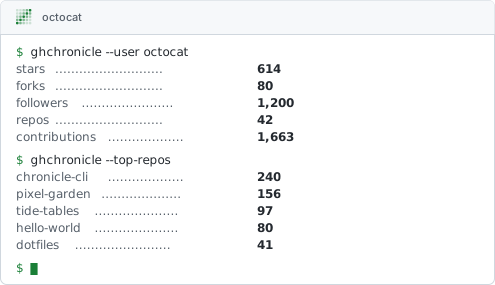
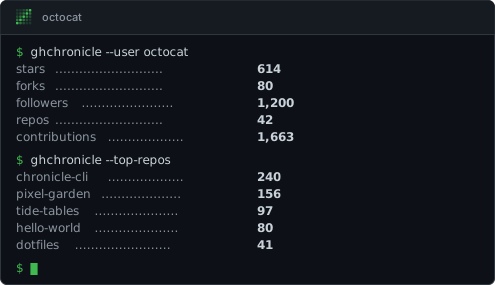
Command for terminal
Binary
ghchronicle -card-layout terminal -card-theme both -card-only -card card.svg -config config.yamlghchronicle -card-layout terminal -card-theme both -card-only -card card.svg -config config.yaml -card-motion loopGitHub Action
- uses: jmrplens/ghchronicle@v2 with: token: ${{ secrets.GHCHRONICLE_TOKEN }} mode: card card: generated/card.svg card-layout: terminal card-theme: both- uses: jmrplens/ghchronicle@v2 with: token: ${{ secrets.GHCHRONICLE_TOKEN }} mode: card card: generated/card.svg card-layout: terminal card-theme: both card-motion: loopHow fast it plays
Section titled “How fast it plays”-card-speed is a decimal from 0 to 1, and 0.5 is the default. It is one
number for the whole card: every animated layout scales by it, the two
continuous motions with the reveals, so a card set slower has a band that takes
longer to come round and a cursor that blinks more slowly at the same time.
-card-speed | What the card does |
|---|---|
0 | The slowest animation, twice as long as the default |
0. | Exactly the card this renderer always drew, to the byte. The default |
1 | The fastest, half as long as the default |
There is one knob and not one per layout for the reason there is one width and not one per layout: the cycles here were paced against each other, and scaling them together is what keeps the pacing the motion was designed with. A speed outside the range is refused before the sweep runs, naming both ends.
prefers-reduced-motion is untouched by any of this: a reader who has asked
their machine for less motion gets no animation to slow down or speed up.
In a README
Section titled “In a README”<picture><source media="(prefers-color-scheme: dark)" srcset="generated/card_dark.svg"><img src="generated/card.svg" alt="My GitHub statistics"></picture>The workflow that keeps it current, for a profile README or any other, is in A card in your profile README.
There is no Go library
Section titled “There is no Go library”The renderer lives in internal/render, and Go refuses that import from
outside the module, so there is no way to draw a card from your own program by
calling into this one. A program that wants an SVG runs the binary with
-card and reads the file, the same way it would run any other command: see
calling it from a program.